 Balance
Automatic balance collection
The part that saves the most time: the balance is collected without anyone remembering to do it.
At a glance
What happens to the balance, and when.
- Charged at
- 9am in your store's time zone
- Charged how
- Shopify charges the saved card on the order
- If it fails
- Payment link, then retries after 1, 3 and 7 days
- After four failures
- Order flagged overdue, you are alerted
- No saved card
- Shopify payment link on the due date instead
- Source of truth
- The order's outstanding amount in Shopify
Balance Due never holds, receives or moves money. It asks Shopify to charge the payment mandate that Shopify saved at checkout, and Shopify runs the charge through your own payment provider.
The due date, minute by minute
A balance that goes through first time, which most do.
- 1
Three days before
Reminder sent
The customer gets an email, and a text on Growth and Pro, with the amount and the date. On mandate stores it says the card will be charged.
- 2
9am on the day
Charge submitted
Balance Due asks Shopify to charge the payment mandate for the amount due. Every charge carries an idempotency key, so a retry after a network problem can never double-charge.
- 3
Shopify runs the charge
Balance charged
Shopify sends it through your provider and records the transaction on the order. The order's outstanding amount drops to zero.
- 4
Within minutes
Receipt sent
Balance Due confirms the payment, sends the customer a receipt with the remaining balance, which is now nothing, and tags the order deposit:paid.
- 5
Hold released
Paid in full
The fulfilment hold comes off. The order appears in the next morning's digest as paid overnight and ready to fulfil.
When the charge is declined
Most failed balances are expired cards, not customers walking away. The process assumes that.
The first failure
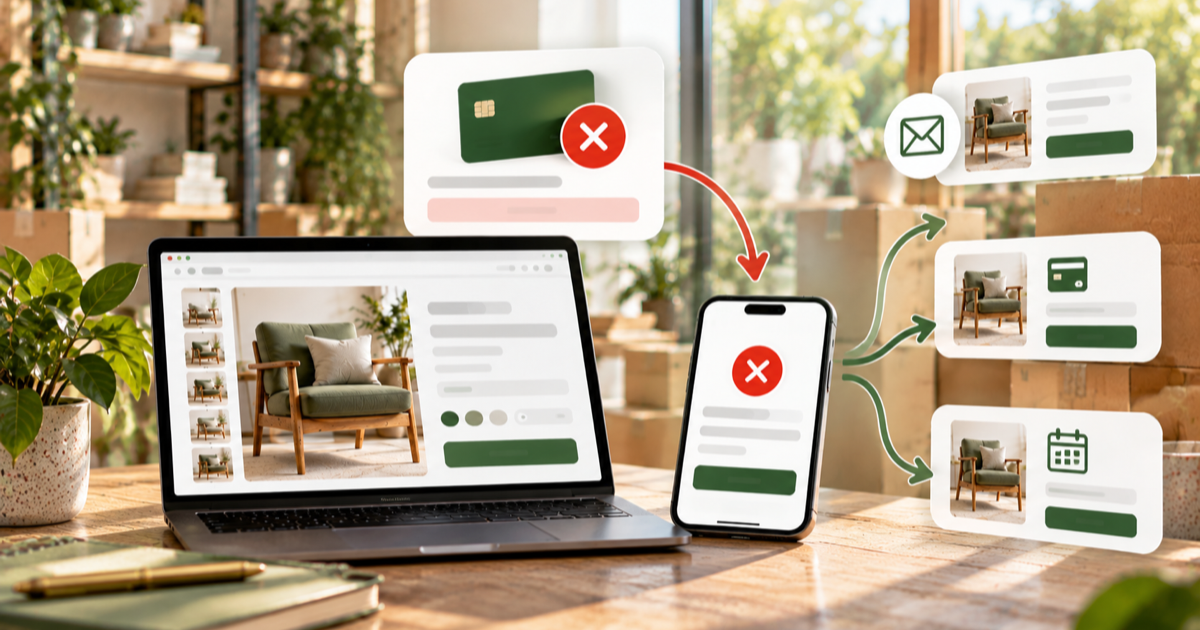
The customer gets an email, and a text on Growth and Pro, explaining the payment did not go through, with the date of the next attempt and a Shopify payment link so they can settle with another card straight away.
- The payment link accepts any card, through Shopify's own checkout
- A customer-initiated payment can pass a bank challenge that an unattended charge cannot
- The order stays on hold throughout
The retry ladder
Balance Due retries after 1 day, then 3 days, then 7 days. Each failure sends the same message with a fresh link. The ladder is the default and can be changed in settings, including adding or removing steps.
- Four attempts in total over eleven days
- Failed attempts cost nothing from Shopify Payments or from Balance Due
- Collect now from the order tries again immediately at any point
Overdue
After the fourth failure the order is marked overdue. The customer gets an overdue notice every 3 days with the payment link, you get an alert, and the order is tagged deposit:overdue so it stands out in Shopify.
- Your order page shows the last decline reason and every message sent
- Reschedule the payment and the nudges pause until three days before the new date
- Waive part of the balance, or cancel the plan and keep the deposit under your policy
Stores without saved-card charging
Shopify Payments and PayPal Express can save a card at checkout and charge it later. Some other providers cannot. If yours cannot, Balance Due runs the pay-link flow instead: on the due date it asks Shopify to email its invoice with the payment link and sends its own message with the same link, then nudges every 3 days.
When the customer pays through the link, Shopify records the transaction, and Balance Due sees the outstanding amount drop, closes the plan, releases the hold and sends the receipt. The reminders, the hold and the customer page are identical; only the charge itself is customer-initiated rather than automatic.
The app checks your provider on install and tells you which flow your store will use, so there is no surprise on the first due date.
Following the order
Orders change after they are placed. The balance follows them.
Order edited upward
An extra item or a dearer variant. Balance Due reconciles against Shopify and adds the difference to the schedule.
Refund or edit downward
The schedule shrinks. If the deposit now covers the whole order there is nothing left to charge and the plan closes.
Paid another way
A balance taken over the phone, on POS or by bank transfer and recorded in Shopify closes the plan. The saved card is not charged on top.
Order cancelled
The plan is cancelled with it and nothing further is collected. Refunding the deposit is your policy, handled in Shopify.
Reconciliation runs whenever Shopify tells the app an order has been updated or refunded, and you can press sync on any order to reconcile it immediately.
Taking control
Five actions on any order, from the order itself.
| Action | What it does | When you would use it |
|---|---|---|
| Collect now | Charges the whole outstanding balance immediately | A commission finished early, or a customer who asks to settle up |
| Mark ready | Triggers the balance on plans set to charge when the order is ready | The piece is finished, the stock has landed, the stone is fixed |
| Reschedule | Moves any payment to a new date and restarts the reminder | A delivery date moves, or you agree more time with the customer |
| Waive | Writes off part of the balance and lets the order complete | A goodwill reduction, or a substitution that came in cheaper |
| Cancel plan | Stops collecting and tags the order deposit:cancelled | The job is off and the deposit is being handled under your terms |
Collect now and reschedule from the order are included from the Growth plan upward. See pricing for what each tier includes.
What you see in Shopify
Every deposit order is tagged deposit:active, then deposit:paid, deposit:overdue or deposit:cancelled, so you can filter your Orders page without opening the app. The order note carries the schedule. Balance Due's own dashboard lists every open plan with its next payment date.
Each morning at 8am store time you get a digest: due today, due this week, failed or overdue, and orders paid in full overnight that are ready to fulfil. An overdue order also sends an immediate alert.
Nothing is skipped. A due payment is queued, not fired once and forgotten, so an outage on the due date means a charge at the next run, never a missed balance.
Keeping failures down
- Keep the three-day reminder on, so the customer can top up or swap cards before the charge.
- Keep balances within a few months of the order where the trade allows. Cards expire and circumstances change.
- Use the ready rule for anything with an uncertain date, so the charge never lands before the goods exist.
- Say in your policy what happens if the balance cannot be taken, so the overdue notice is not a surprise.
Related
Reminders and receipts
Every message the customer gets, and when.
When a balance payment fails
What to do, and what happens automatically.
Fulfilment hold
Why nothing ships until it is paid.
Deposits
Percentage or fixed, on the products you choose, as a normal Shopify purchase option.
Customer payment page
One link, no login: the schedule, what is paid, what is left, and a pay now button.
Questions
What if Shopify or the app is down on a due date?
Nothing is skipped. Due payments are queued, not fired once and forgotten, so they are charged at the next run when service returns.
Can I change the retry schedule?
Yes. The 1, 3 and 7 day ladder is the default and can be changed in settings, including adding or removing steps.
Does the customer see a separate charge from the deposit?
Yes, the balance charge appears on their statement as a separate payment to your store, the same way any Shopify payment does.
Does a failed attempt cost anything?
No. Failed attempts are not charged by Shopify Payments, and Balance Due has no per-attempt or per-order fee.
Can the customer pay the balance early?
Yes, from the pay now button on their payment page. On mandate stores it charges the saved card; on pay-link stores it opens Shopify's payment link.
Can the customer pay with a different card?
Yes. Every failed-payment and overdue message carries a Shopify payment link that accepts any card. The saved card is only used for the automatic charges.
What if I take the balance over the phone?
Record the payment against the order in Shopify. Balance Due sees the outstanding amount drop to zero and closes the plan, so the saved card is never charged on top.
Who holds the card details?
Shopify. The card is saved by Shopify's checkout as a payment mandate on the order. Balance Due never sees card numbers; it asks Shopify to charge the mandate when the balance is due.
See the whole flow
The how-it-works page follows one order from the product page to paid in full.